No contractFree number transfer30-day money-back guarantee

See every price
Finish

Every call, accounted for.

Who called, who answered, how long they talked and the road the call took. So when someone asks, you know.

Tuesday, November 311 calls

A sample day with made-up callers.

The page itself. Nothing to set up.

Every call on the account lands here on its own, grouped by day, in the account’s time zone. Rows per page and the view you left are waiting when you come back.
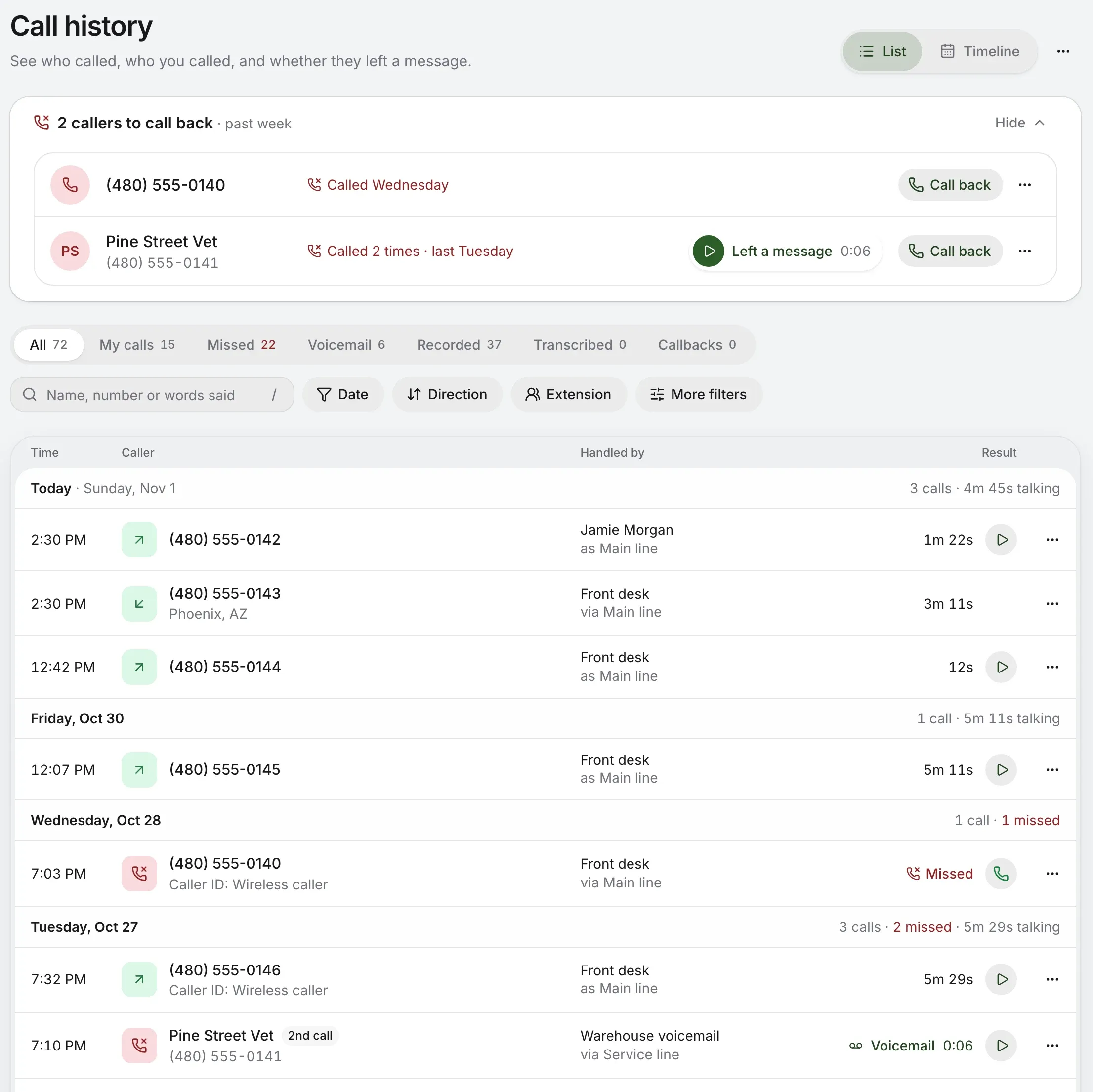
Call history: two callers to call back, then quick views and filters, and calls by day, each with who handled it and what came of it
  1. To call backCallers still waiting, at the top. Call them, or mark them handled.
  2. Quick viewsAll, My calls, Missed, Voicemail, Recorded, Transcribed and Callbacks, each with its count.
  3. SearchBy name or number, and by words said on transcribed calls.
  4. Who, and by what roadWho handled it, and the line it came in on or went out as.
  5. Plain wordsCaller ID that isn’t a name reads as what it is.
  6. What came of itHow long they talked, Missed, or the message, ready to play.

The to-do list that clears itself.

A missed caller stays at the top until someone deals with it. Nobody has to remember to tick anything off.

2 callers to call back in the past week, one who left a message, each with Call back
  1. You call them. A later call out to that number takes them off.
  2. They get through. A later call from them that someone answers does too.
  3. You say so. Mark as handled, for the whole account, with Undo.
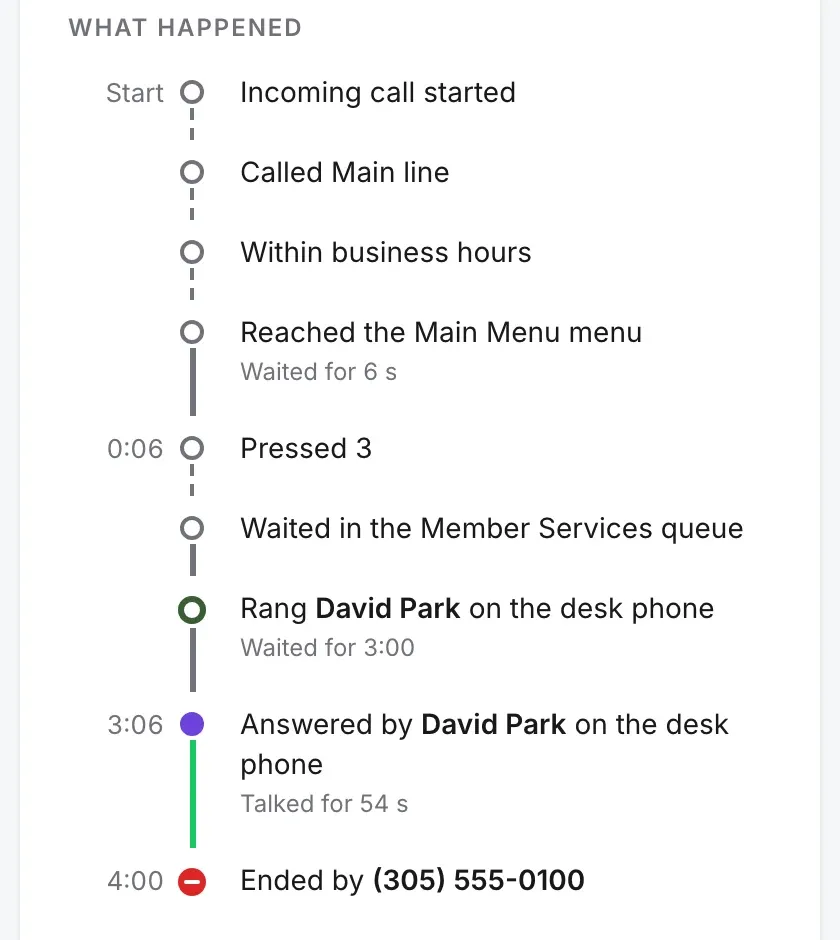
What happened on the call, step by step: the number dialed, the menu, the queue, who answered and when it ended

The whole road. Step by step.

Open any call. Each step it took is there, from the number dialed to who hung up, with how long it waited at each one.

  • Why they waited. The menu key they pressed, the queue and who rang.
  • What was said. The recording, its transcript, and notes from the team.
  • Who they are. Their other calls, and a way to save the name.

This screen is from Harper Valley National Bank, our demo account. The bank, its people and its callers are made up.

Or see the day as a picture.

The Timeline gives each person a lane, hour by hour, with the quiet hours folded. Above it, a month at a glance, each day shaded by how many calls it took.
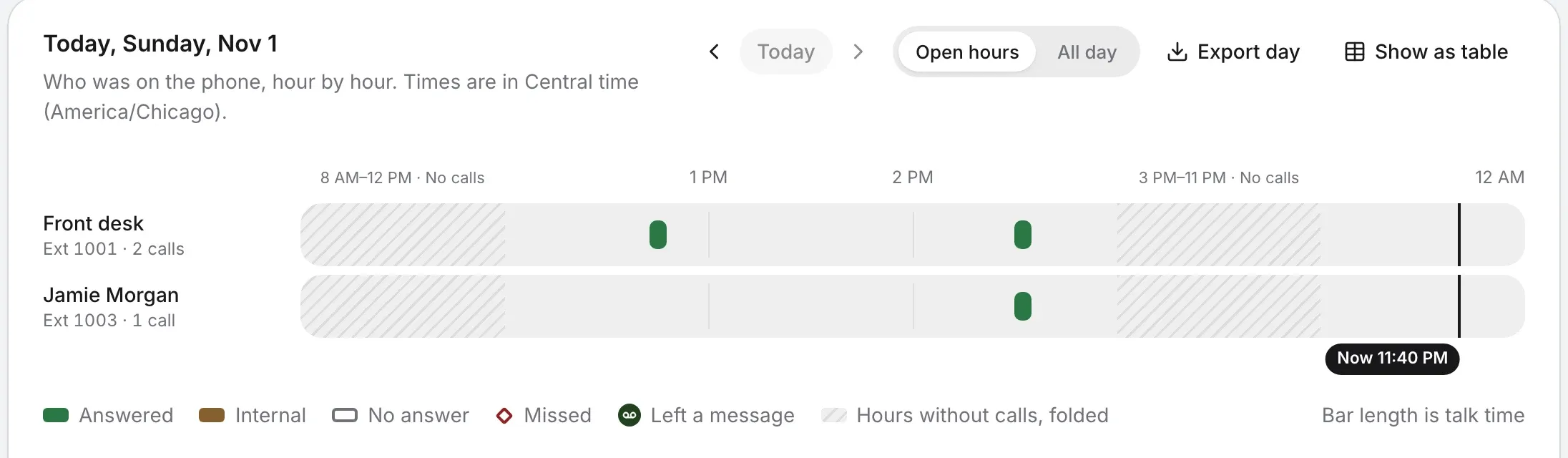
The Timeline’s day: a lane for each person, a bar for each call, the hours without calls folded, and what each colour means
  • AnsweredSomeone talked, whichever way it went.
  • InternalBetween two people in the company.
  • No answerNobody picked up, and nobody’s waiting.
  • MissedSomeone should call them back.
  • Left a messageA message waits to be heard.

Phone networks shout. This doesn’t.

The name a call arrives with is often no name at all. Call history reads it and says what it really is, so you don’t see two strangers both called Wireless Caller.

  • WIRELESS CALLER(480) 555-0140Caller ID: Wireless callerWords that aren’t a name lead with the number.
  • PHOENIX AZ(480) 555-0143Phoenix, AZA place reads as a place.
  • REYES,TOMASTomas Reyes(602) 555-0127Last-first reads first-last.
  • MESA SUPPLY INCMesa Supply(480) 555-0144A name you’ve saved wins, on every call, past ones too.

Who sees what

Everyone has My calls for their own. For recordings and transcripts, owners and admins pick one: nobody else, their own calls, or every call they can see.

More on roles

Take it with you

100,000

calls at a time in a spreadsheet, with exactly the filters you set. Or pick the calls you want, or a day or month from the Timeline. Exports go in the activity log.

In your pocket

The same history on iPhone, Android and Mac, with your numbers, views and search.

See the apps
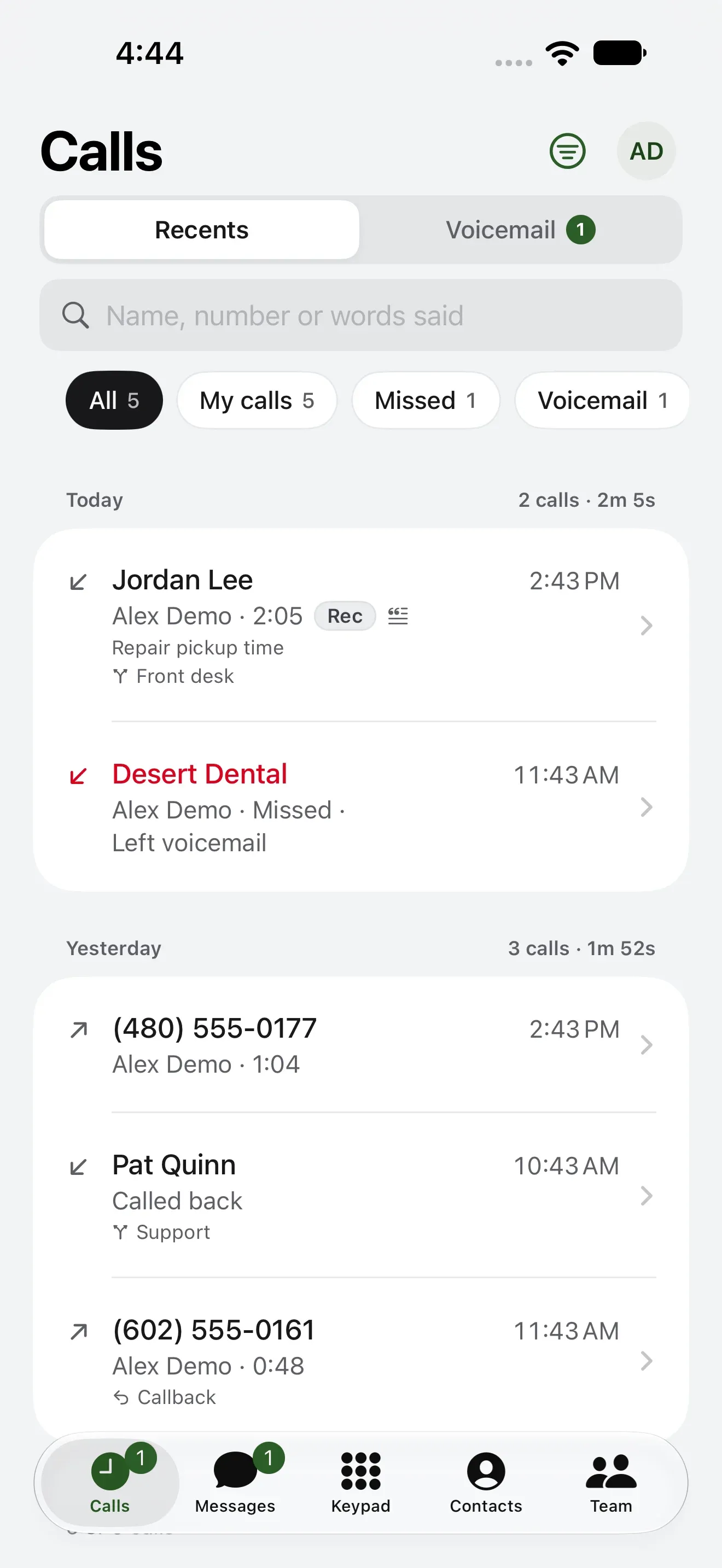
Calls in the iPhone app: a caller to call back, then today’s calls

Questions about call history.

Can I export call logs?
Yes. Export up to 100,000 calls at a time as a spreadsheet, with exactly the filters you set, or just the calls you pick. The Timeline exports its day or its month.
Can each person see only their calls?
Everyone has My calls for their own: calls they placed, answered or were rung for. Owners and admins choose who can play recordings: nobody else, their own calls, or every call they can see.
Does it show missed calls nobody returned?
Yes. Callers still waiting for a call back sit at the top. Call them, or have them call back and get through, and they come off by themselves. Mark as handled clears one, with Undo.
Can I search what was said?
On calls that have been transcribed, yes: search by the words said, three letters or more. Transcription is its own add-on.
How far back does it go?
There’s no cut-off. Your calls stay in history, and a date filter gets you to any of them.
Do homes get it?
Yes, in simpler words: each call in a home account, its line, whether it was recorded, and any message.

Know what happened on every call.

Check your number, then pick a plan. Call history comes with every Kafono account.

No number yet? Pick a new one

Rather talk it through? Write to us and a person answers.