No contractFree number transfer30-day money-back guarantee

See every price
Finish

One key
to the right person.

Greet every caller with a menu of your own: press 1 for appointments, 2 for billing, or dial a person’s extension. Each key goes where you choose, and you change it from your account whenever you like.

  • Every key on the keypad, and menus inside menus
  • A greeting in your voice or a natural one
  • See which keys callers press

“Thanks for calling Example Dental. For appointments, press 1. For billing and insurance, press 2. For our hours and directions, press 3. For a call back, press 4. For the front desk, press 0.”

Extension

The front desk

Rings the front desk phone, extension 1001.

Ring group

Appointments

The front desk and back office phones ring together.

Call queue

Billing and insurance

Callers wait their turn for the next free person in billing.

Another menu

Hours and directions

“We’re open Monday to Thursday, 8 to 5…” Then 0 goes back to the main menu.

Callback list

A call back

The caller leaves their number and hangs up. The front desk calls back from the list.

Dialed directly

Jamie Morgan, ext 1003

Callers who know an extension dial it instead of choosing a key.

Not on the menu

The menu plays again

So nobody lands somewhere they didn’t choose.

Press a key on Example Dental’s menu

Try it: press a key.

1Where keys go

Every key goes where you choose.

A key can ring a person or a whole team, line callers up, open another menu or take a message. You pick from the people and groups you already have.

  • A person

    Rings their phone wherever they answer it: a desk phone, the app or the browser.

  • A ring group

    Several phones at once, or one after another until someone picks up.

    More
  • A call queue

    Callers wait their turn for the next free person, with your hold music.

    More
  • Another menu

    “For hours and directions, press 3” opens a menu of its own, with a key back.

  • Voicemail

    A shared mailbox, its messages written out and sent by email.

    More
  • A callback list

    Callers leave their number instead of holding, and your team calls back from the list.

    More
  • Another number

    A cell phone, another office or your answering service.

  • The AI receptionist

    It answers, asks what the caller needs and sends you a summary.

    More
  • A conference call

    A standing call for a team that meets by phone, one key away.

2Building it

Build it on one page. Watch the call play out.

Add a key, choose where it goes and what callers hear it called. Beside the keys, the call plays through second by second, timed from your greeting’s real length: when the keys come, each replay, and where a caller who never presses ends up.
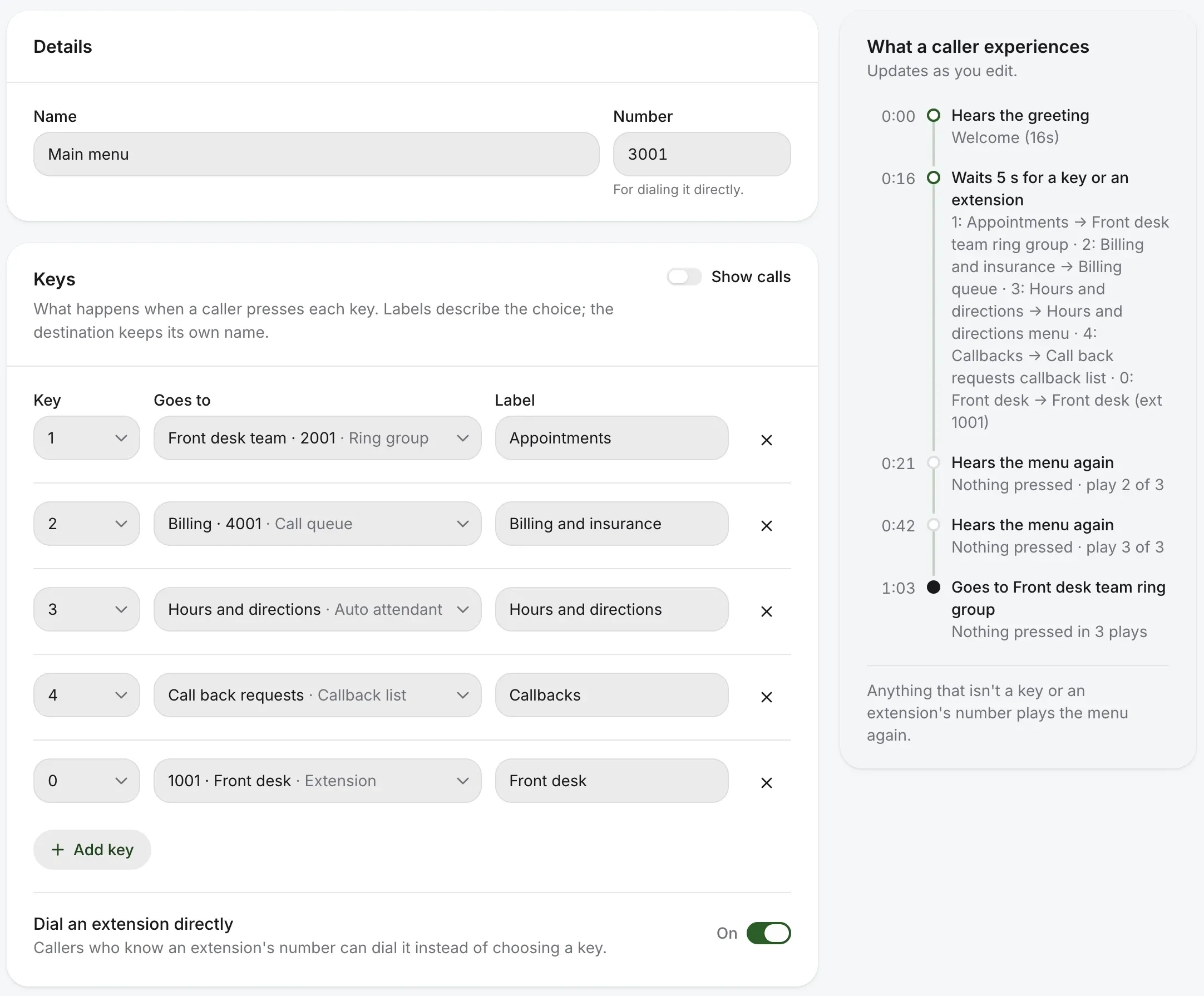
The main menu’s page: each key, where it goes and its label, Dial an extension directly switched on, and beside it what a caller experiences, second by second
  • Any key

    0 to 9, * and #, and longer ones like 22 for a choice you don’t announce.

  • Extensions too

    Turn on Dial an extension directly, and callers who know an extension can dial it instead.

  • Nothing live until you save

    Owners and admins change menus. Everyone else on the account can read them.

3The greeting

The greeting, drafted from your keys.

Choose Create with text-to-speech and the script is already there, a line for each key: “For appointments, press 1.” Change any word, pick a natural voice, play it, and it’s the menu’s greeting.
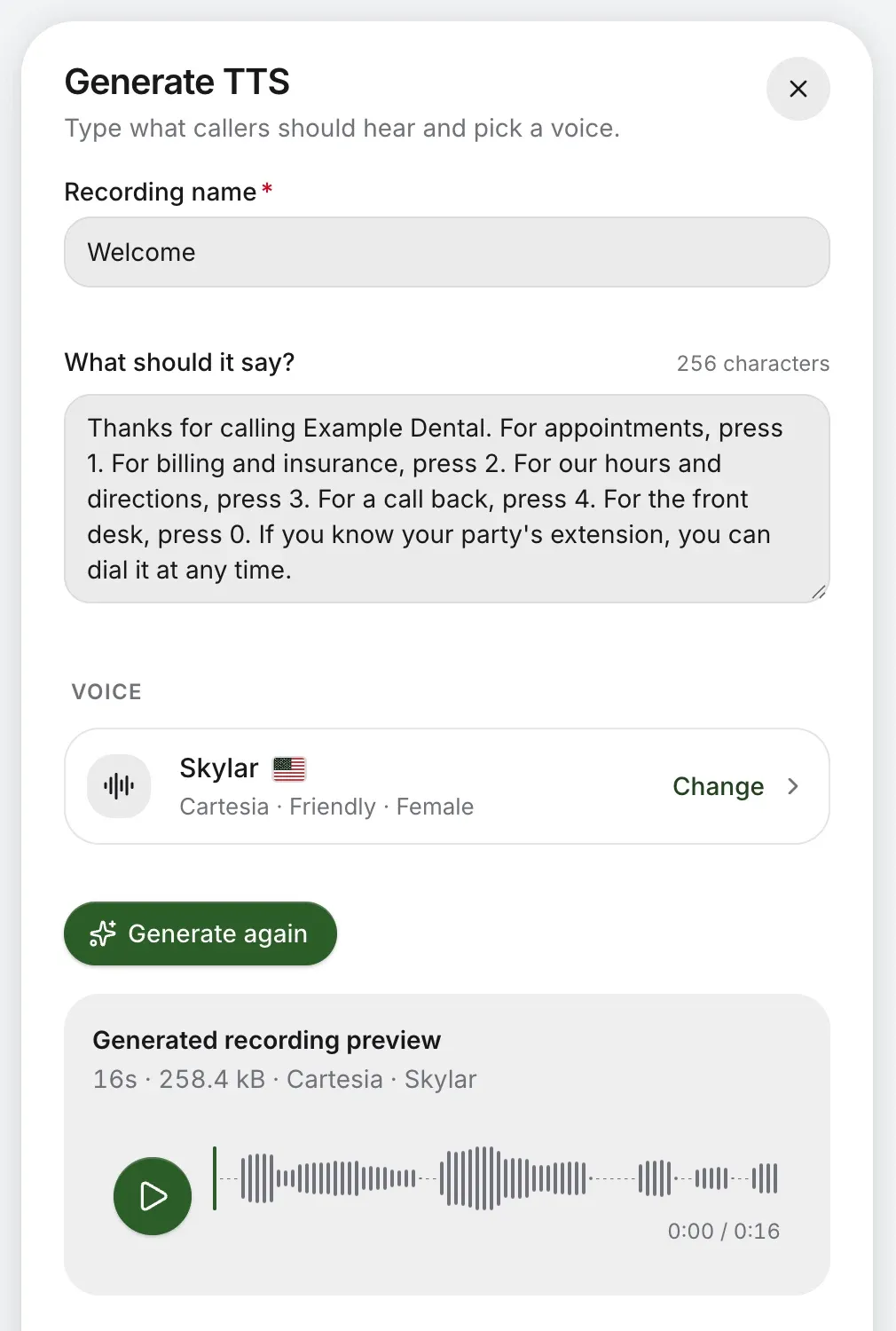
  • Write it for a natural voice, and make it again when a word changes.
  • Record it with your computer’s microphone or the iPhone or Android app.
  • Upload it from a studio or the phone system you’re leaving.
AI voice greetings
A menu greeting written for an AI voice: “Thanks for calling Example Dental. For appointments, press 1…”, with the generated recording to play

4When nobody presses

Pressed nothing? Still answered.

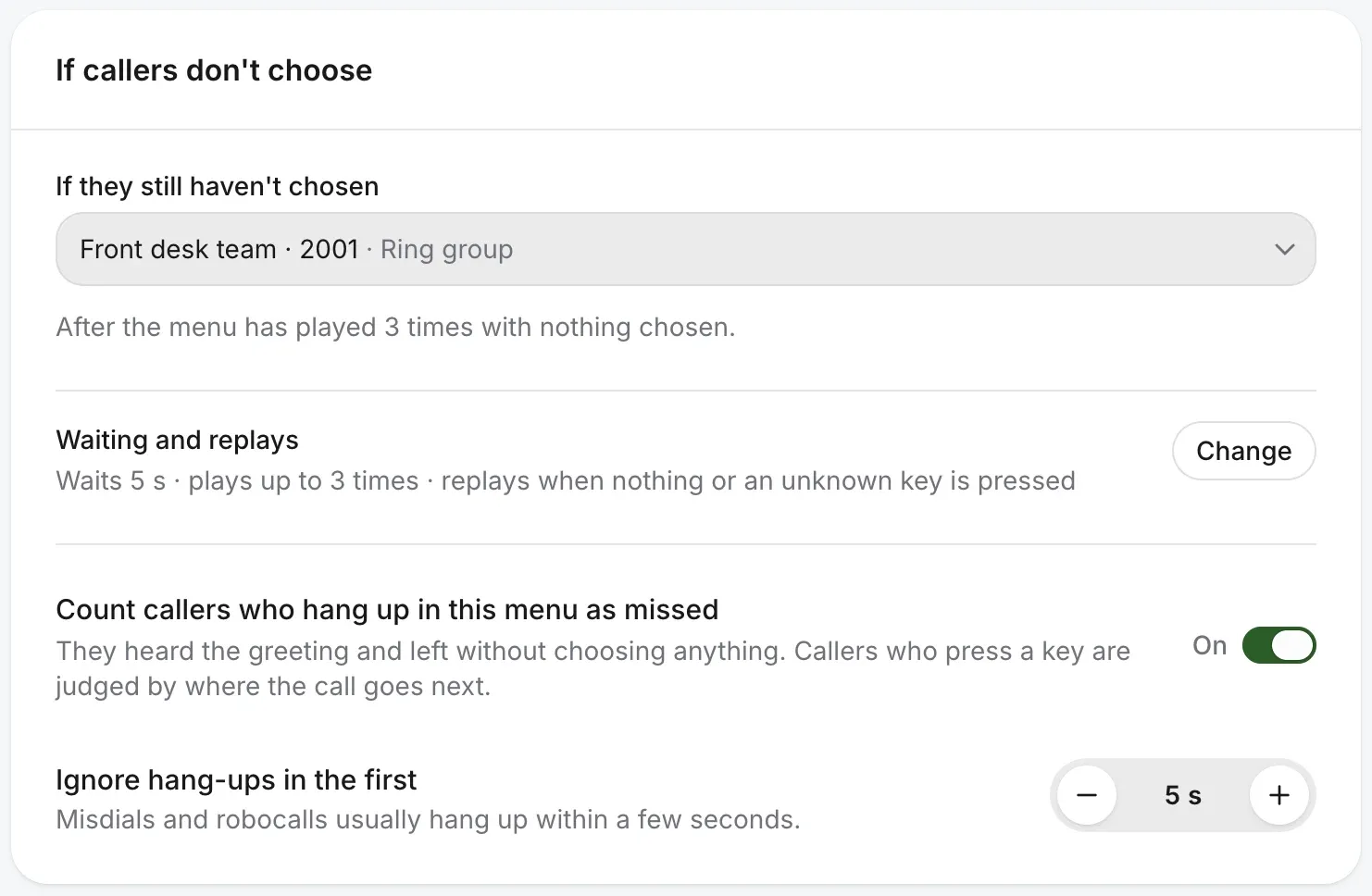
Some callers never press a key. Choose how long the menu waits, how many times it plays and who answers after that, so nobody listens to a loop or gets cut off.
A caller who presses nothing on Example Dental’s menu
  1. 0:00The greeting
  2. 0:21Nothing pressed: it plays again
  3. 0:42Plays a third time
  4. 1:03The front desk team rings
  • Waits 3 to 20 seconds for a key, and plays up to 5 times.
  • A key that isn’t on the menu plays it again, or goes where you say.
  • Callers who give up in the menu count as missed calls, so you see them and can call back. Hang-ups in the first few seconds, mostly misdials and robocalls, don’t count.
  • A menu that would hang up on a caller who presses nothing is flagged in your account.
If callers don’t choose: the front desk team after three plays, the wait and replays, and callers who hang up in the menu counted as missed

5More than one menu

Menus inside menus. Another for after hours.

A key can open another menu, and a key there can lead back. Your hours choose which menu answers: the main one while you’re open, a short one for emergencies and messages when you’re closed.
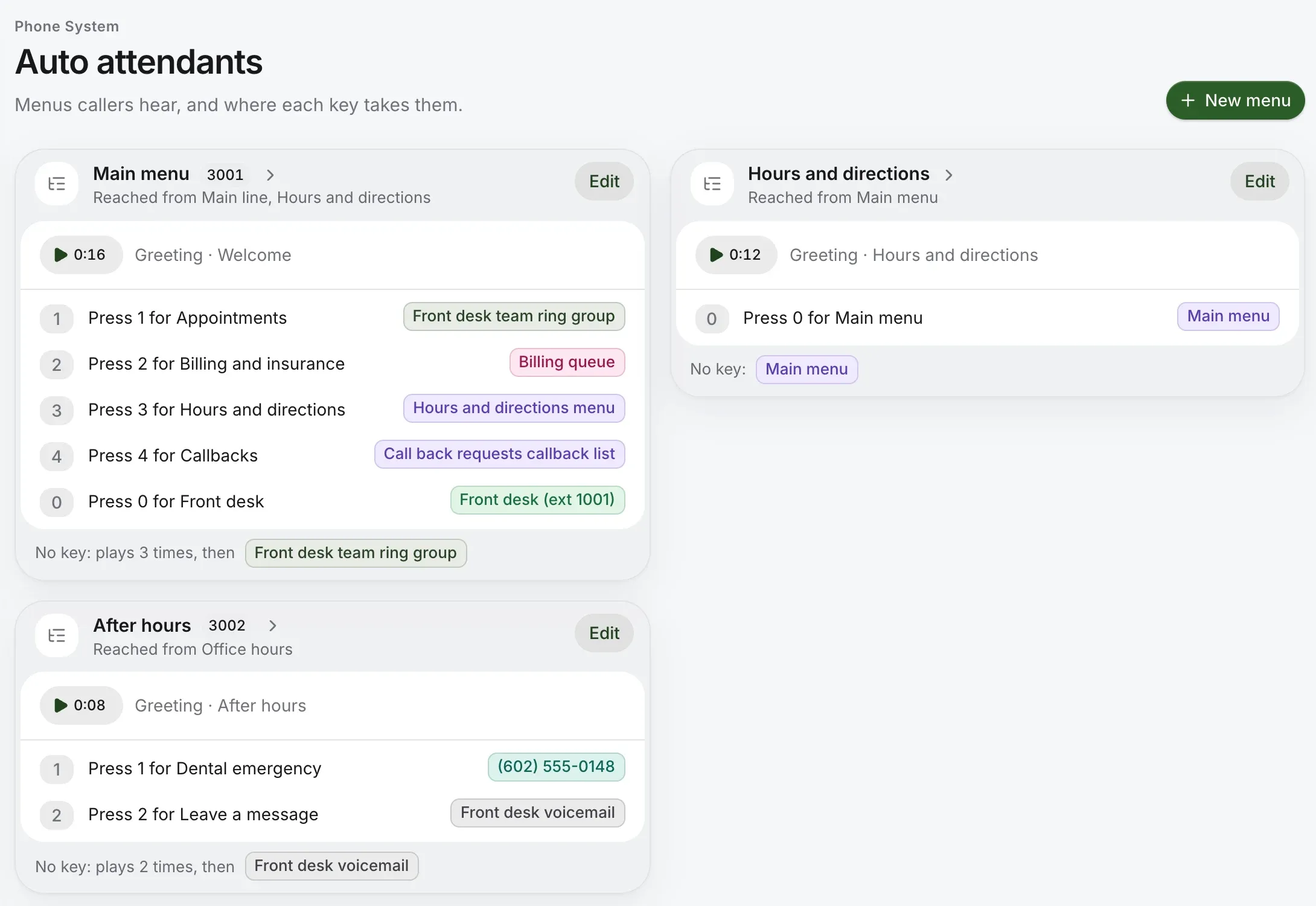
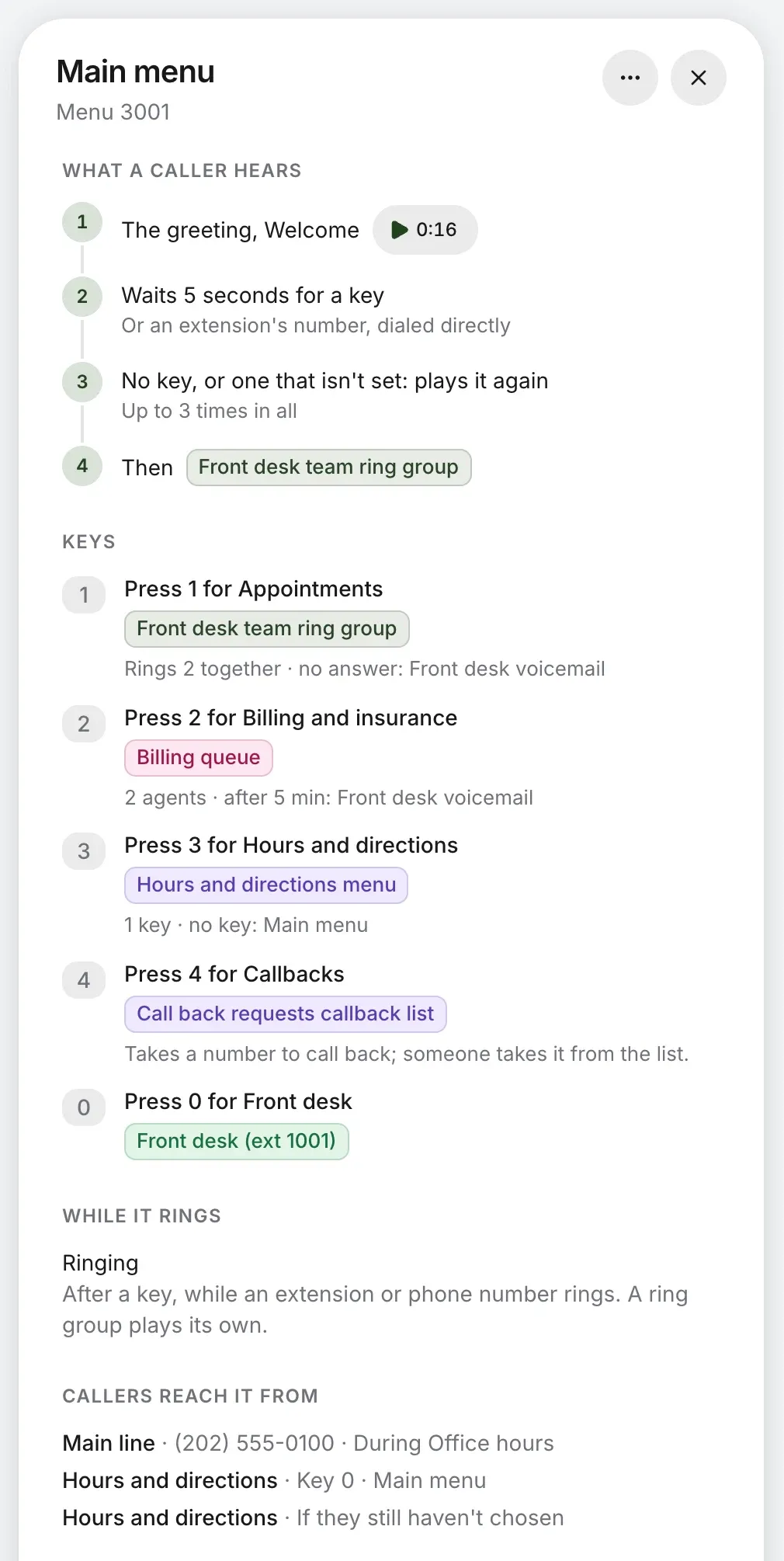
Auto attendants: the main menu with five keys, an hours and directions menu reached from it, and an after-hours menu reached from office hours
The main menu as a caller meets it: the greeting, the wait for a key, the replays, then each key and where it leads
  • Read as a caller

    Open any menu to see it as a caller meets it: the greeting, the wait, and where each key leads.

  • A number of its own

    Give a menu a number, and your team can dial it or send a call straight to it.

  • Hours choose the menu

    Set your hours and holidays once. See how call flows fit together.

6What callers press

See which keys callers press.

Turn on Show calls in a menu to see each key’s calls over the last 30 days, and how many callers pressed nothing or hung up. Insights goes further: where each key’s calls went, how they ended and when in the day.
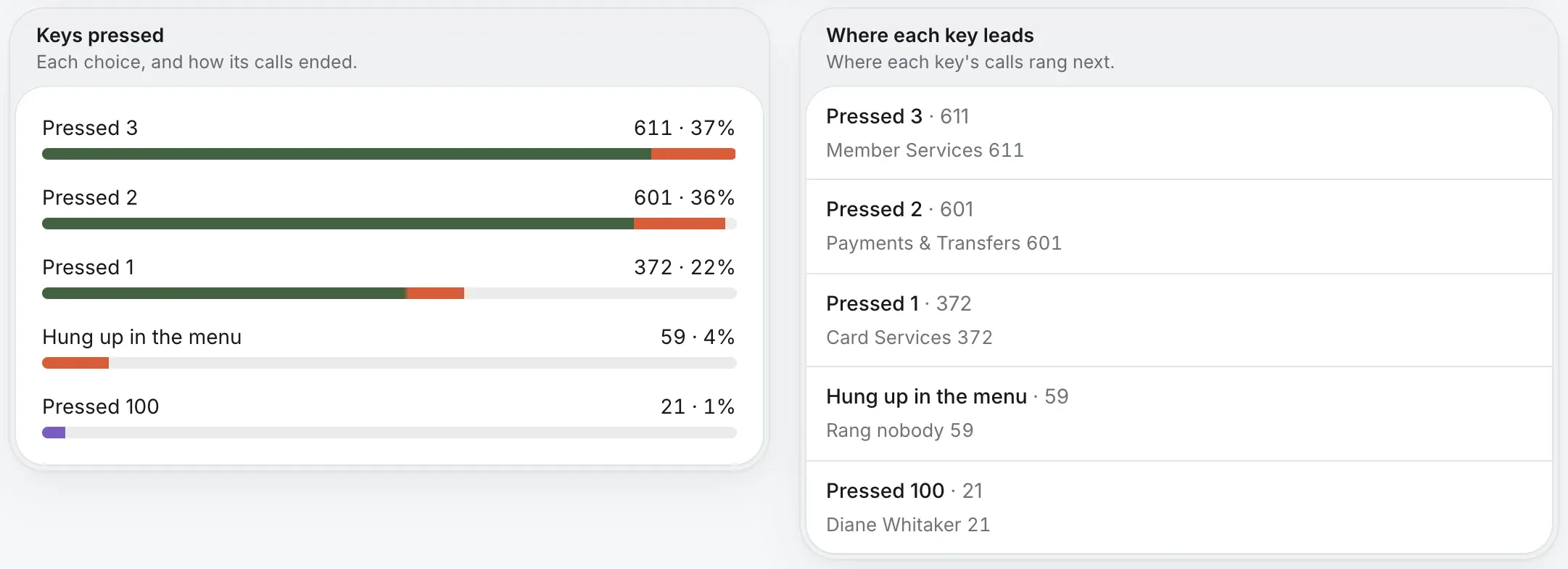
Insights for a phone menu: the keys callers pressed and how those calls ended, and where each key’s calls rang next

In the menu itself

Switch on Show calls and each key says how many calls it took in the last 30 days, with the callers who pressed nothing, pressed a wrong key or hung up.
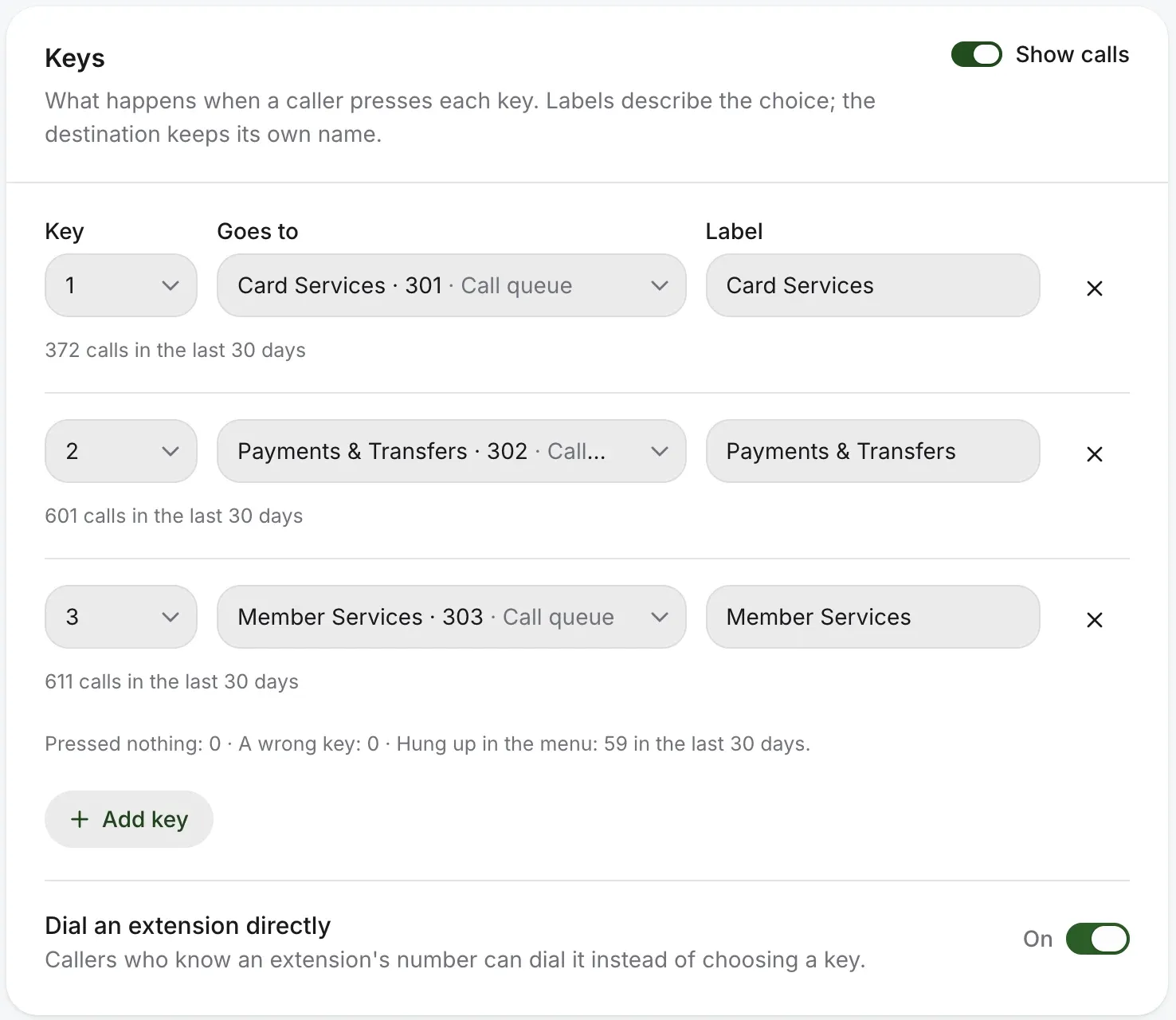
A credit union’s menu keys with Show calls on: each key’s calls in the last 30 days, and how many callers hung up in the menu

Shown on a demo credit union’s menu. More on call analytics

Questions about phone menus.

Is a phone menu the same as an auto attendant or an IVR?
Yes. A phone menu, a dial menu and an auto attendant are the same thing, the simplest kind of IVR: a greeting that asks callers to press a key and sends them where they chose. Your account calls them auto attendants.
How many keys can a menu have?
Every key on the keypad, 0 to 9, * and #, and longer ones like 22 or *9. A key can open another menu, so there’s room for as many choices as callers need.
Can callers dial a person’s extension?
Yes. Turn on Dial an extension directly and callers who know an extension can dial it instead of choosing a key.
What happens if a caller presses nothing?
The menu waits, plays again as many times as you choose, then sends the call where you say: the front desk, a ring group or a mailbox.
Can we have a different menu after hours?
Yes. Your hours decide which menu answers, so callers get the main menu while you’re open and a shorter one when you’re closed or on a holiday.
Can the menu speak Spanish?
Yes. Write a greeting in Spanish and pick a voice that speaks it, then give it a key on the main menu, “Para español, oprima 2,” that opens a menu of its own.
Can we change the menu ourselves?
Yes. Add a menu, change what each key does or the greeting from your account, whenever you like.
Can you set it up for us?
Yes. Tell us how you want calls handled and we’ll build the first menu with you.

Every caller, one key from the right person.

Tell us how your calls should go and we’ll build the first menu with you, greeting included, before your number moves.