No contractFree number transfer30-day money-back guarantee

See every price
Finish

See every caller. Step in on any call.

The live board shows who’s waiting, who’s free and what everyone’s doing, as it happens. From the same screen, a supervisor takes a caller, listens in or puts someone back on the phones.

It’s a working sample. Try it:
My queuesWho’s waiting and what everyone answering is doing, as it happens.
Live · updated just nowCallbacksShow on a TV
Your queuesSample · Example Supply Co.
QueueWaitingLongest waitFreeBusyOn breakCallbacksPeople
Support 4001 Contact center22:140312
Orders 4002 Contact center10:221100
Waiting now 3Oldest first
  • 2:14Dana Ortiz (480) 555-0177SupportRinging Theo Grant
  • 0:51Lena Brooks (602) 555-0163Support
  • 0:22(480) 555-0108OrdersRinging Morgan Lee
2 callbacks waitingCallbacks →
People1 free of 6

Free now · 1

  • Alex Rivera 1006 Orders

On calls · 4

  • Sam Patel 1004 Support
  • Priya Shah 1005 Support
  • Theo Grant 1009 Support
  • Morgan Lee 1007 Orders

Away · 1

  • Nina Flores 1008 Support

Read it at a glance. Then step in.

  • 2

    Amber means callers are waiting.

  • 0

    Red means they’re waiting and nobody’s free.

  • 3

    A soft glow marks what just changed.

The caller

Take them yourself.

Press Take beside anyone waiting, oldest first. Your browser or iPhone dials in and the caller’s put through at once, with no transfer and no hold. A caller who shouldn’t be there? Hang up asks first, then ends it.

2:14Dana Ortiz (480) 555-0177SupportRinging Theo GrantTake

Jamie Morgan took a waiting caller from Support

The person

Put someone back on the phones.

Everyone’s status is a chip, and the chip is its menu. Back from a break and forgot? Available. Gone home? Logged out. Queues send calls only to who’s available, and Free doesn’t count a phone that’s offline.

Nina Flores 1008 SupportOn break since 10:31 AM

The call

Listen. Whisper. Barge.

Press the headphones beside anyone on a queue call. You hear both sides and nobody hears you. Coach them from the call bar, or join in, without a transfer or a hold. On a desk phone, dial *33 and their extension, enter your voicemail PIN, then press 0 2 or 3.

More on listening
LiveSam Patel with Dana Ortiz03:12

You hear both sides. Nobody hears you.You hear both sides. Only Sam hears you.You join the call. Everyone hears everyone.

On the callWho hears it
  1. Dana

    “I was told my order would ship Friday.”

    DOSPYou
  2. Sam

    “Let me pull that up for you.”

    DOSPYou
  3. You

    On the line, saying nothing. Nobody knows you’re here.

    DOSPYou
  4. Sam

    “It shipped this morning, and the tracking’s in your email.”

    DOSPYou
  5. You

    “It shipped this morning. The tracking’s in Dana’s email.”

    DOSPYou
  6. Sam

    “Good news, Dana. It shipped this morning.”

    DOSPYou
  7. You

    “Hi Dana, this is Jamie, Sam’s manager. I have your order here.”

    DOSPYou
  8. Dana

    “Oh, thank you, Jamie.”

    DOSPYou

Callbacks

Hang up. Keep your place.

Nobody has to choose between holding and starting over. A caller asks for a callback and gets on with their day, and their turn still comes.

Dana’s phone

Example Supply Co.On hold · 2:04

“To keep your place in line and have us call you back, press nine.”

Example Supply Co.On hold · 2:11

“You’re calling from (480) 555-0177. To receive your callback at this number, press 1. To enter a different number, press 2.”

Call ended

Nothing to hold. Nothing to do until the phone rings.

Example Supply Co.(480) 555-0100

The number Dana called, so it’s no stranger.

Your team’s screen

Waiting now

2:042:11Dana OrtizSupportTake

Support callbacks

Dana Ortiz (480) 555-0177

Call back on (480) 555-0177 · Waiting

From Support · Pending 0:12 · Expires 3:18 PM

Ringing Sam Patel

Callback (480) 555-0177

Dana Ortiz · Support · In line since 2:16 PM

DeclineAnswer

Sam Patel’s call bar

Dana Ortiz Callback · 0:03

Ringing, then talking through the same call.

In call history: Called back

After a wait you choose, two minutes unless you change it, the queue offers a callback, and offers it again while they hold.

They keep the number they called from, or key in another. Kafono reads a new number back before it takes it.

A stand-in holds their place, and the line moves as it would have. On the team’s side, it’s a request with a timer.

The next free agent gets it like any other call, marked Callback. Nobody has been dialed yet, so a missed offer costs the caller nothing.

The moment the agent answers, Kafono dials the caller. The agent hears it ring, and the caller sees the number they called. Call history says Called back.

An automatic list

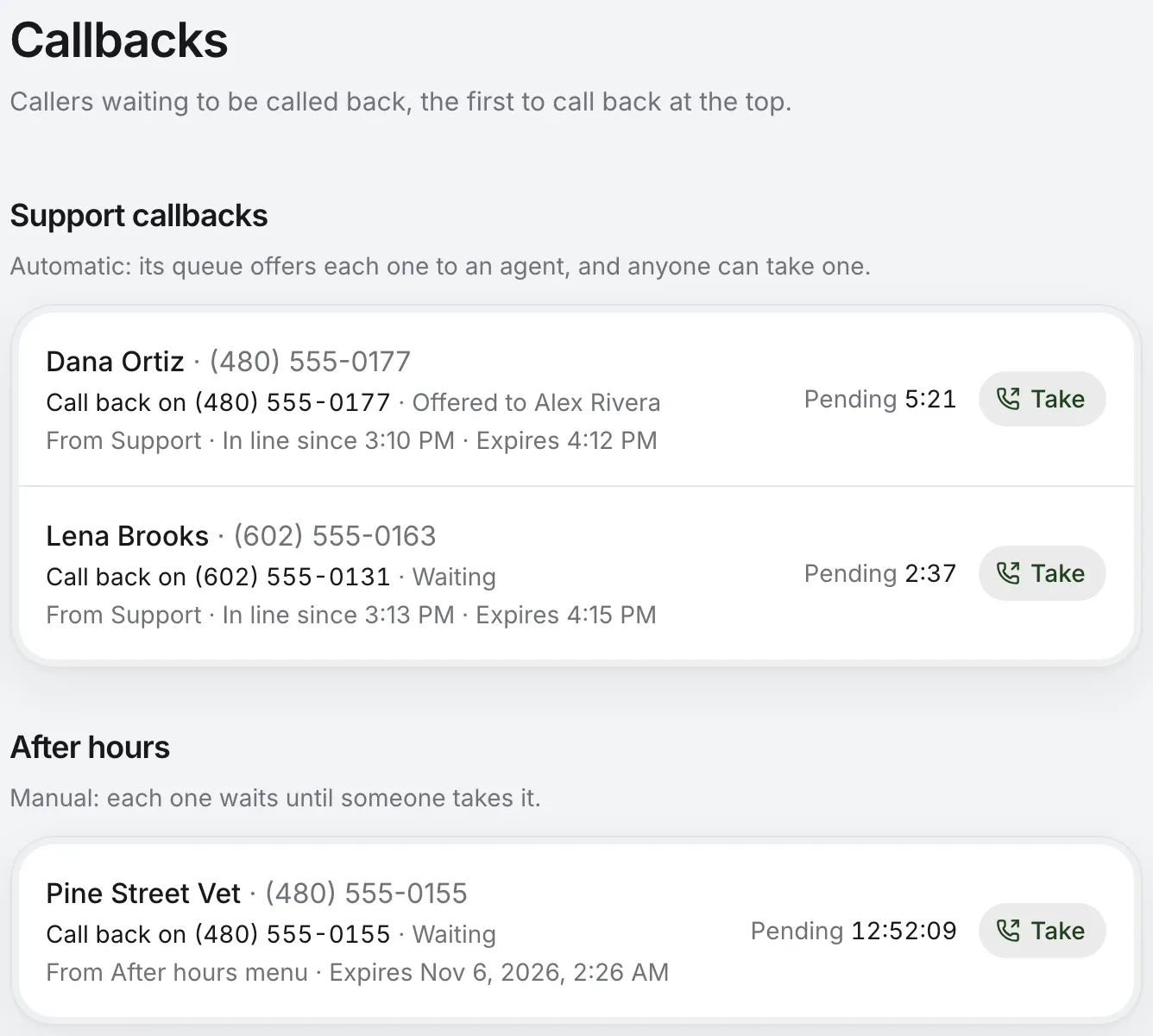
Delivers through one contact center queue, so a caller who left that queue keeps their place. The queue offers each request to its agents, and anyone can still take one.

A manual list

Each one waits until someone presses Take, in the portal or the iPhone app, which gets a push for each new request. Good for after hours: it waits 3 days unless you change it.
More on callbacks
Callbacks: an automatic list whose queue offers each request to an agent, a manual list waiting for someone to take each one, and for each caller the number to call back, how long it’s been pending and Take
  • Not only from a queue. A menu option, an after-hours route or a queue’s timeout can send callers to a list.
  • One try. Kafono dials once. Busy or no answer closes the request and says so in call history.
  • No doubles. Asking twice links to the same request, and getting through on a later call closes it.

Front desk

Whoever answers sees everyone.

Front desk is a page in the portal for the person on the phones: the call in hand, who’s waiting, who’s on hold or parked, and the whole company beside them. Drag a call onto someone, or press their name.
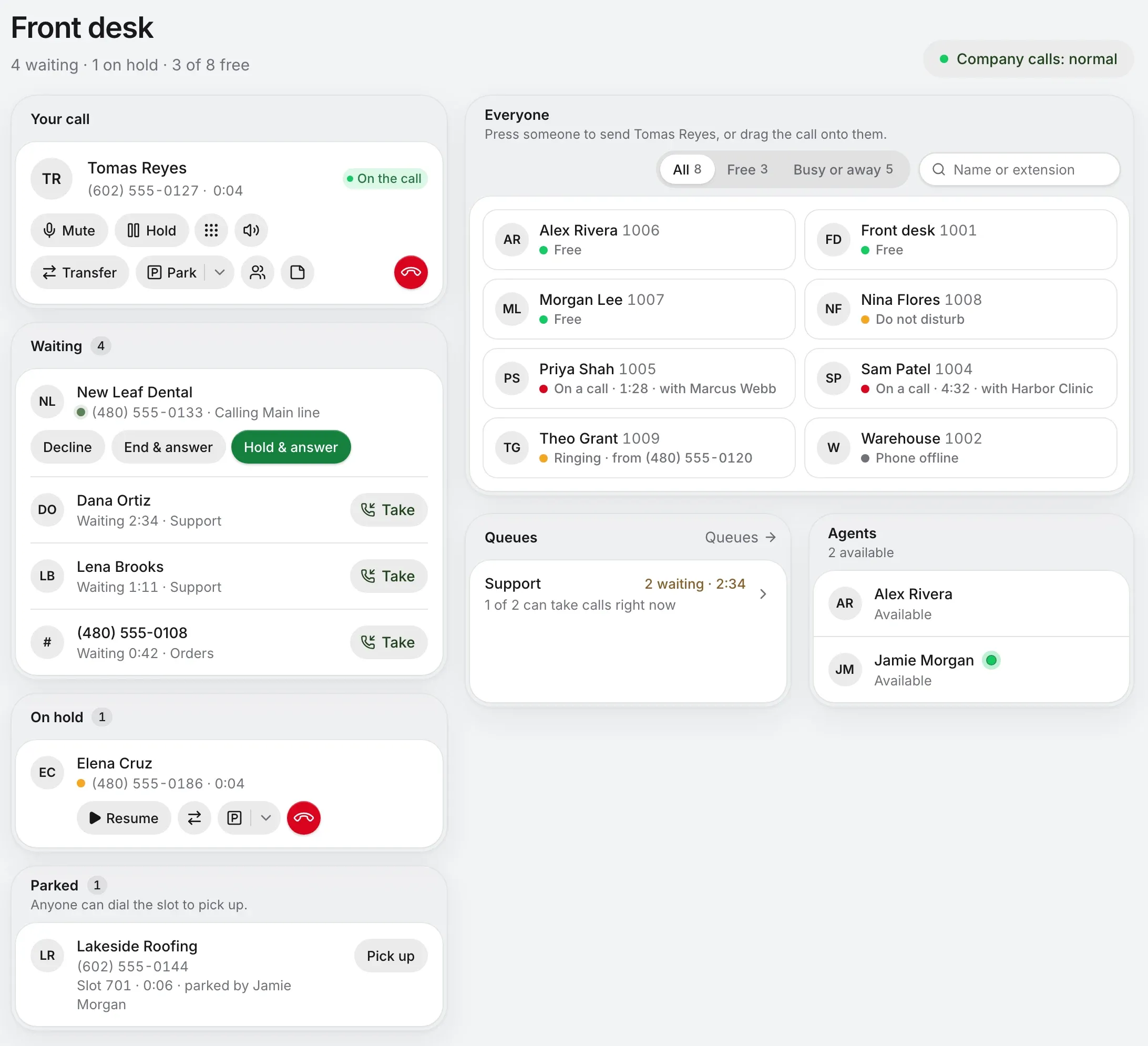
Front desk: the call in hand with its controls; who’s waiting, ringing on the main line or in a queue with Take; a call on hold and one parked; and everyone in the company, free, on a call with whom or away, beside the queues and agents
  • It knows the line. A ringing call says which company number it came in on, like Calling Main line, so you answer it right.
  • It knows who’s free. Free, on a call and with whom, ringing, Do not disturb, forwarding or phone offline. A tile follows a coworker hanging up within seconds.
  • It’s there on every page. Away from Front desk, Everyone floats in a small window you can move and resize, with Transfer now, Talk first and Send to voicemail for the call in hand.
  • It’s for every login. Anyone on a business account can open it. It answers and sends calls from the browser, so a headset is all it needs.
More on Front desk

Put it on the wall. No login left open.

Show on a TV makes a private link to the queues you choose. Open it on an office TV, or a PC over HDMI. Nobody signs in, so nobody’s account sits on a screen anyone can walk up to.
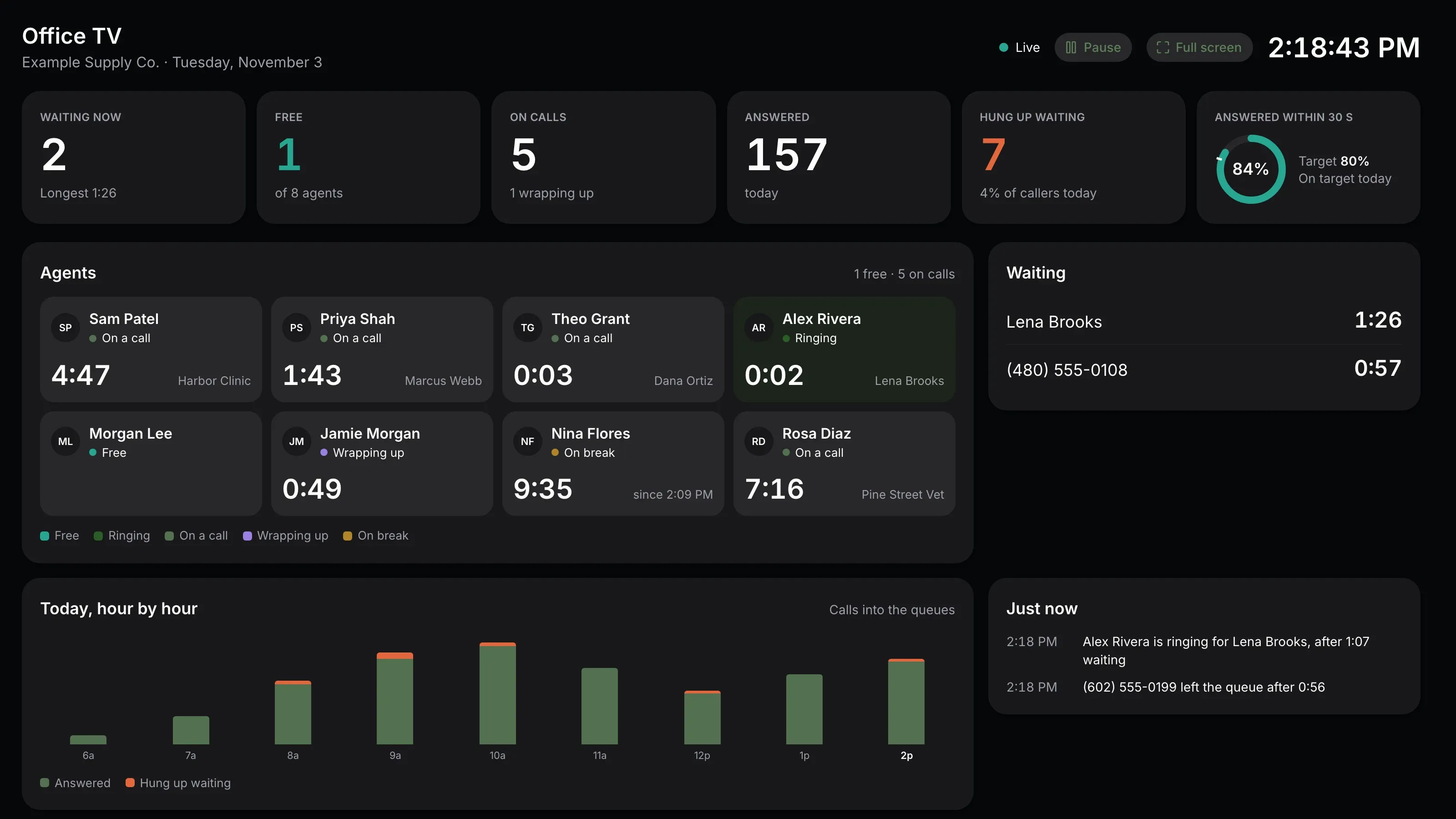
The live board on an office TV: waiting now, free agents, on calls, answered today, hung up waiting, the share answered within 30 seconds against its target, each agent’s state and time, who waits, today hour by hour and what just happened
  • Six figures, large. Waiting, free, on calls, answered, hung up waiting, and the share answered within your goal.
  • It looks after itself. It refreshes every 10 seconds, runs full screen and keeps the screen awake.
  • Yours to turn off. Owners and admins make each link, and revoking one stops it working at once.

The right people. And a record of it.

Pick supervisors one queue at a time. They need no admin rights and don’t have to answer the queue’s calls. Takes, hang-ups and every listen go in the activity log: silent on the call, on the record after.

WhatOwners and adminsQueue supervisorsAgents
See the boardEvery queueTheir queuesTheir own queues, to read
Take or hang up a waiting callerYesYesNo
Change someone’s statusYesYesTheir own
Listen, whisper, bargeAny callCalls through their queuesNo
Take a callbackYesYesYes
Show it on a TVYesNoNo

Activity · Live calls

  1. Jamie Morgan took a waiting caller from Support
  2. Jamie Morgan listened in on Sam Patel
  3. Jamie Morgan whispered to Sam Patel
  4. Jamie Morgan barged in on Sam Patel
  5. Jamie Morgan hung up a call with (480) 555-0108
More on the activity log

Questions supervisors ask.

Who can see the live board?
Owners and admins see every queue, and a supervisor sees the queues they look after. Agents see their own queues and coworkers, read-only, and change only their own status.
Does anyone know I’m listening?
No. Neither the caller nor your teammate hears a beep or sees a sign. Whether and how you tell callers and staff that calls may be monitored is for your company’s policy and the law where you are.
Can I see it away from my desk?
Yes. The iPhone app’s Team tab has the queues you watch, with Take and Hang up, agents’ status, and Listen, Whisper and Join. The Mac app has Queues too.
Which queues can offer a callback?
A contact center queue offers one with a key, 9 unless you pick another, and the caller can keep their place in line. A simple queue’s exit key, a menu option or an after-hours route can send callers to a callback list too, where someone takes each one.
How long does a callback wait?
Each list sets its own limit, from 1 minute to 7 days. Unless you change it, that’s an hour on an automatic list and 3 days on a manual one. A request past its limit closes without a call, and call history says so.
What if nobody picks up the callback?
Kafono dials once and rings for a minute, long enough for voicemail to answer, so your agent can leave a message. Busy or no answer closes the request, with what happened in call history. There’s no automatic redial.
Do I need special phones for Front desk?
No. Front desk answers and sends calls from the browser, so it needs a computer and a headset. Everyone else keeps the phones they have.

See your calls, as they happen.

Check your business number. The live board and Front desk come with business phone.

No number yet? Pick a new one

Rather talk it through? Write to us and a person answers.