No contractFree number transfer30-day money-back guarantee

See every price
Finish

Name it once. Everyone knows.

One person saves a name, and the whole team sees it on calls, voicemail and texts. Try it on this number.

Call history

(480) 555-0144Mesa Supply(480) 555-01443m 11s

Name (480) 555-0144

Caller ID gave no name, so it shows the number.

Or try

The name replaces the caller ID on this number’s past and future calls.

Voicemail

(480) 555-0144Mesa Supply“Hi, it’s about Tuesday’s delivery…”

Last month’s calls, too

(480) 555-0144Mesa SupplySep 28 · Missed

Messages

(480) 555-0144Mesa Supply

Can we move Tuesday’s order to Thursday?

Sam’s iPhone, ringing

Incoming call

(480) 555-0144Mesa Supply

Six screens, and nobody knows who it is.Six places, and nobody else did a thing.

The desk phone at the front

Incoming

(480) 555-0144Mesa Supply

One list. For the whole account.

People and businesses, each with their company, numbers and email. Search it by any of them, from the web or the apps.
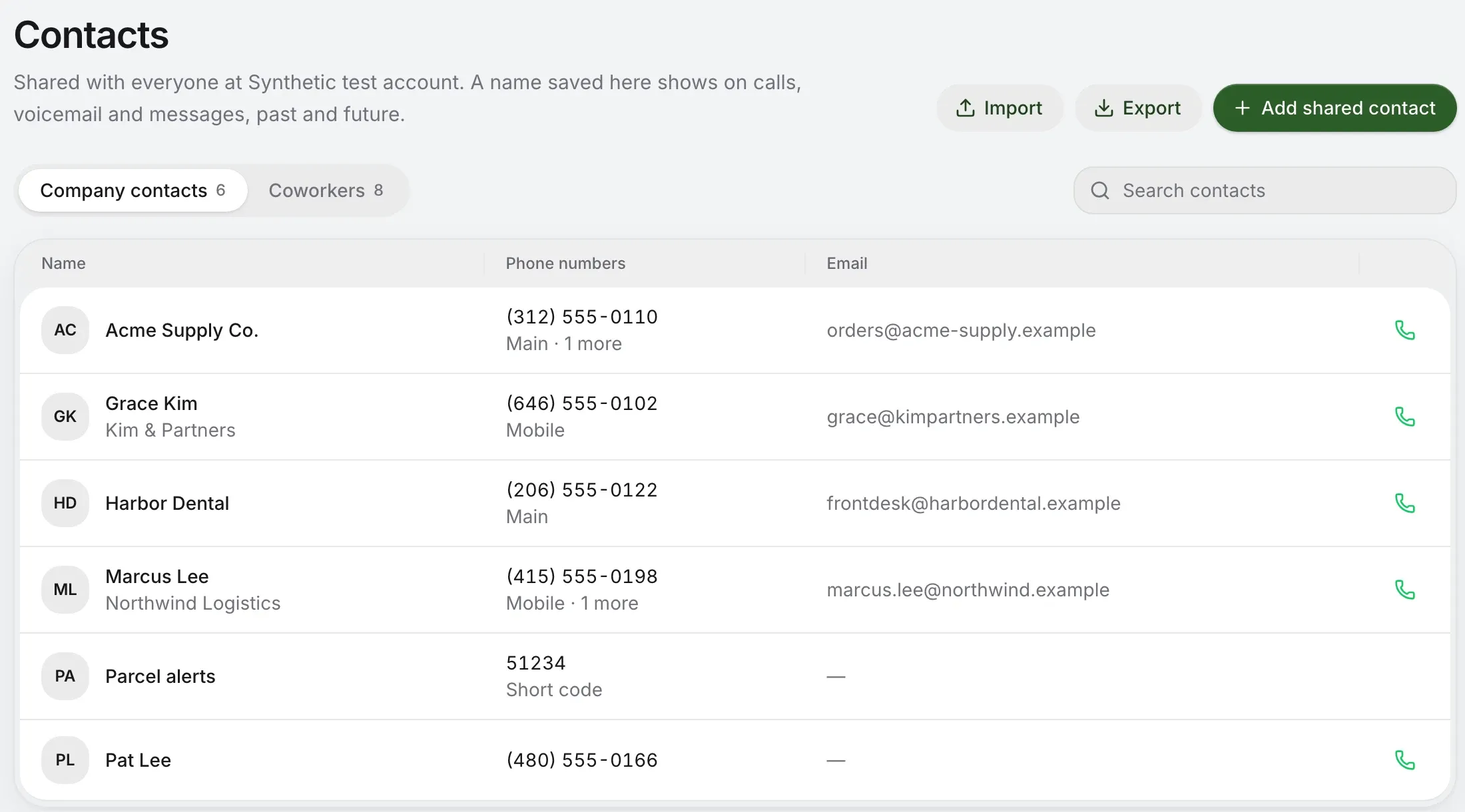
Contacts: company contacts with each one’s company, numbers and email, and Import, Export and Add shared contact

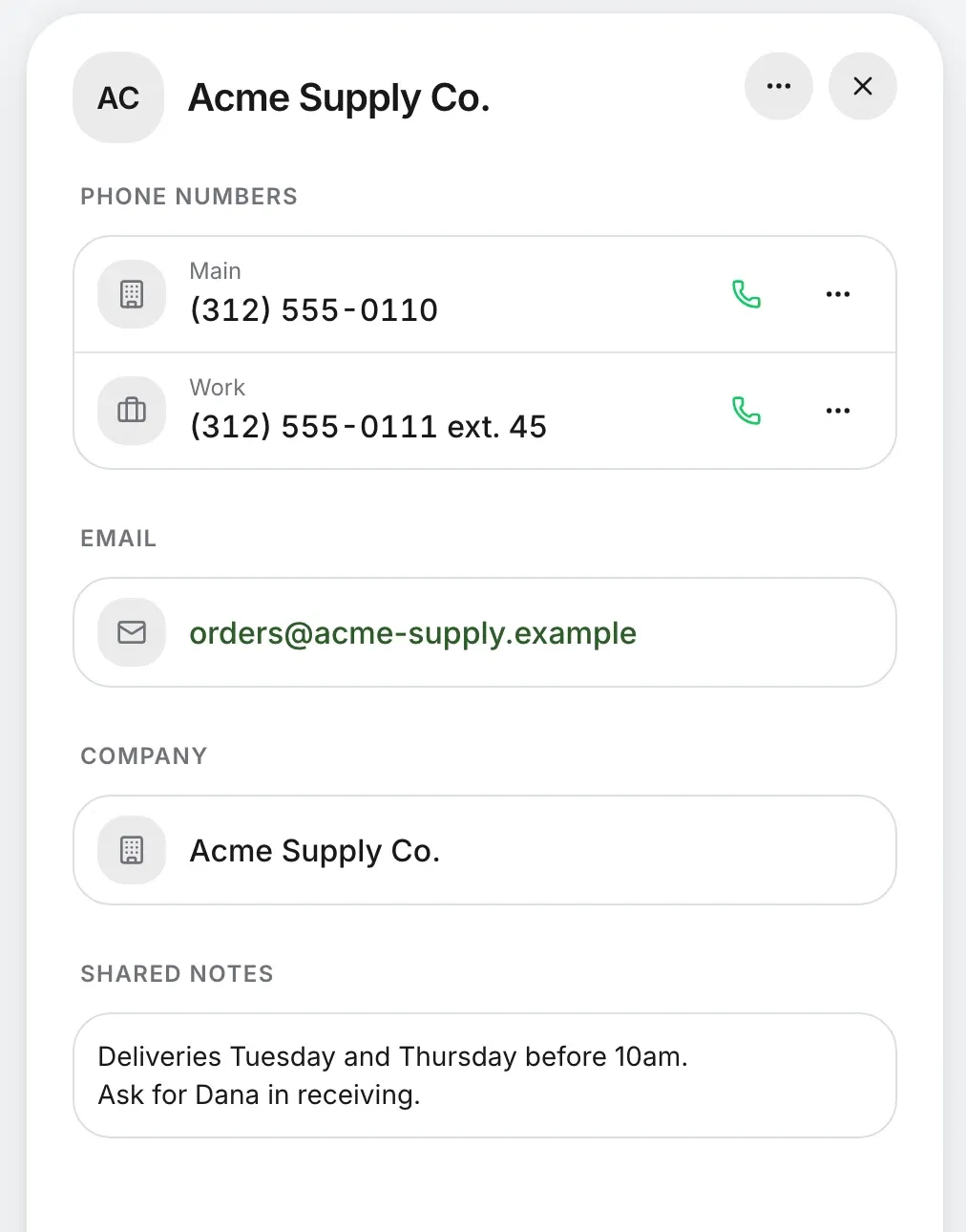
One card. Every number.

Main, mobile, billing and the rest, up to ten on a contact, each with its label. A person behind a switchboard gets the number with their own extension.
  • Mobile
  • Work
  • Main
  • Home
  • Billing
  • Other
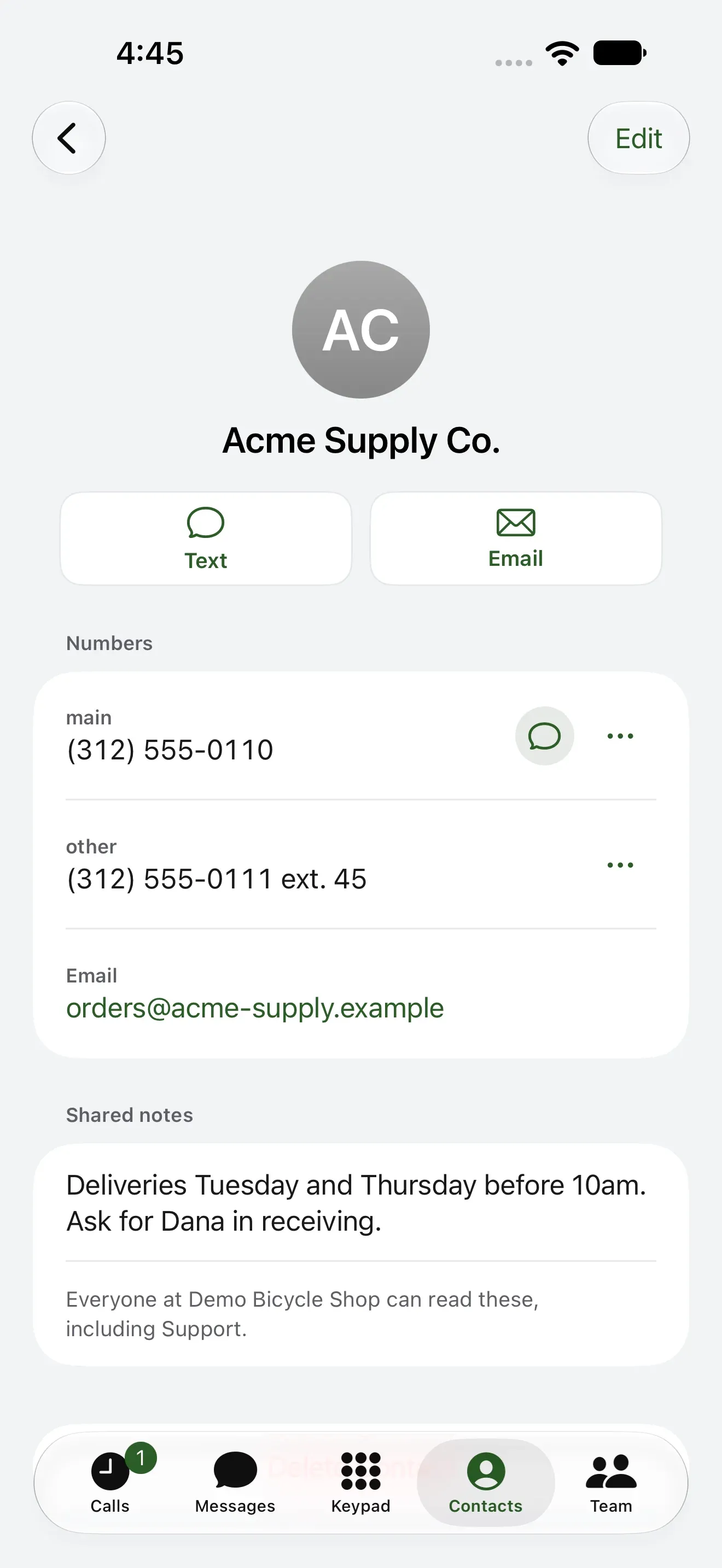
  • Notes the whole team reads. “Deliveries Tuesday and Thursday before 10am. Ask for Dana in receiving.”
  • Its recent calls. The last five with any of its numbers, under the card, and a link to the rest.
  • One number, one contact. So a name can’t disagree with itself. Move a number to another contact any time. It never moves on its own.
A contact’s panel: Acme Supply Co. with two labeled numbers, one with an extension, an email, a company and shared notes

Bring the whole list. Overwrite nothing.

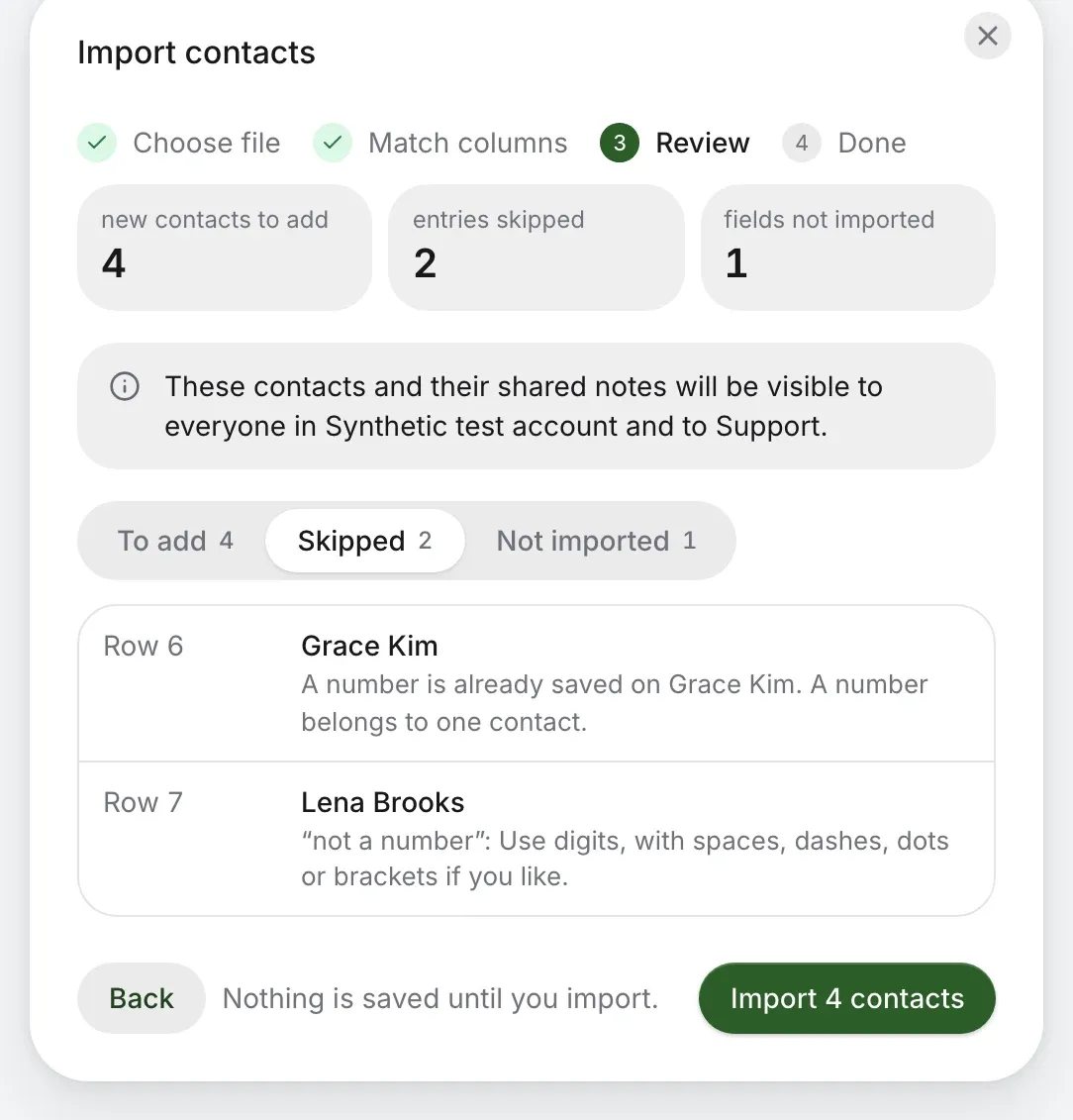
Up to 5,000 contacts at a time, from a spreadsheet or the vCard your phone or Outlook exports. You see every line’s fate before anything’s saved.
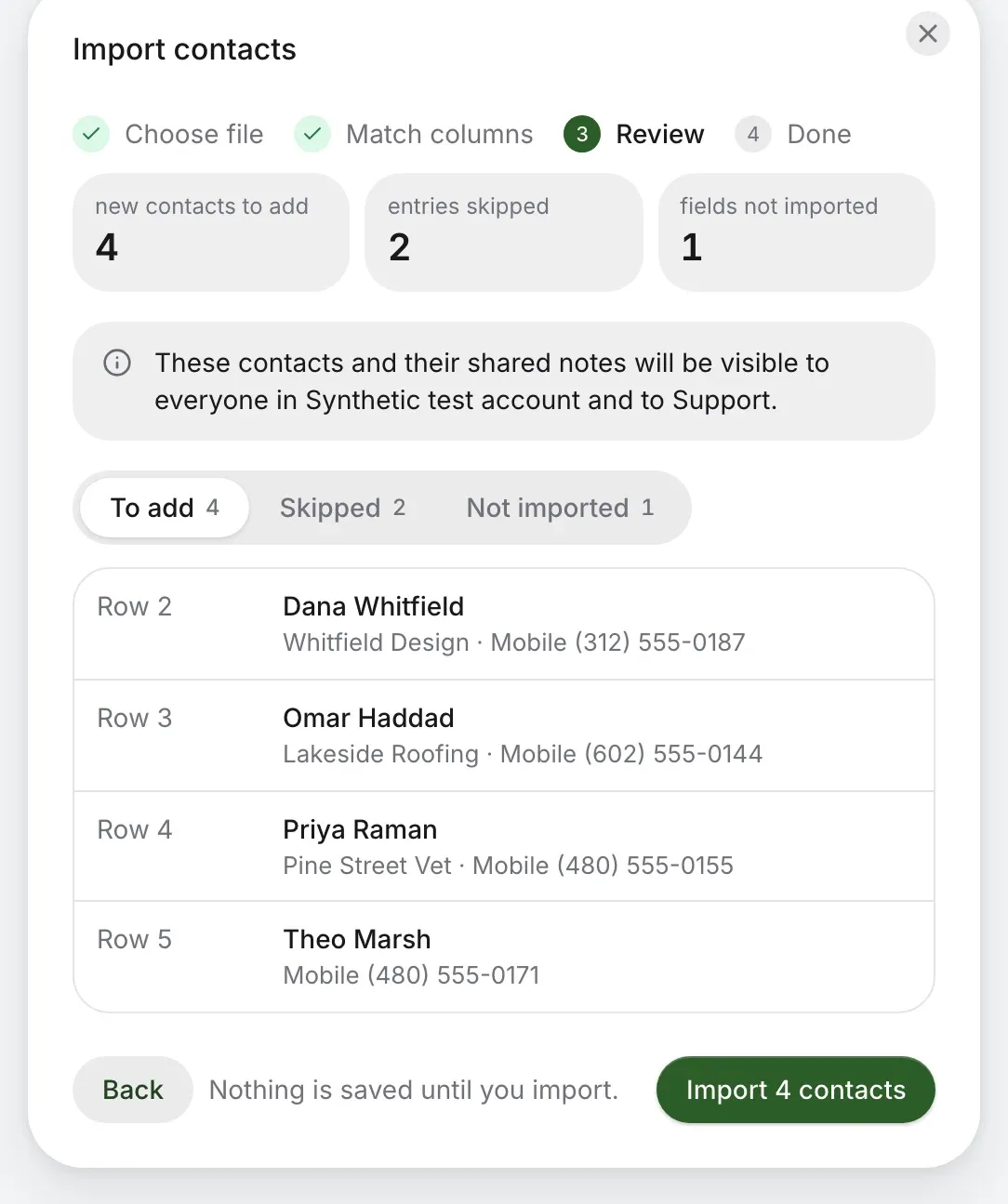
contacts.csv
  1. Dana WhitfieldTo add
  2. Omar HaddadTo add
  3. Priya RamanTo add
  4. Theo MarshTo add
  5. Grace KimNumber’s already saved
  6. Lena Brooks“not a number”
Import contacts, Review: 4 new contacts to add, 2 entries skipped, 1 field not imported, and nothing saved until you import
The skipped entries and why: a number already saved on Grace Kim, and “not a number” for Lena Brooks
  • It tells you why. Each skipped row says what’s wrong, and fields it can’t use are named.
  • It starts you off. A blank spreadsheet to fill in, or match your own columns.
  • It lets you leave. Owners and admins can export every contact as a spreadsheet, in the format import reads.

Your phone’s contacts stay yours.

In the iPhone, Android and Mac apps, you can also see the contacts already on that device. It’s optional and it’s yours alone: they never reach Kafono’s servers, or anyone else on the team.
Company contacts
Everyone on the account sees them, on every app.
On this device
Only you, only here, read-only, and only after you turn it on. If a name matches, you see your own.
A contact in the iPhone app, with Call, Text and recent calls

Your coworkers are already in it.

Everyone with an extension is listed under Coworkers, with no typing, and the web says who’s free right now. Names come from your phone system, so a new hire just appears.
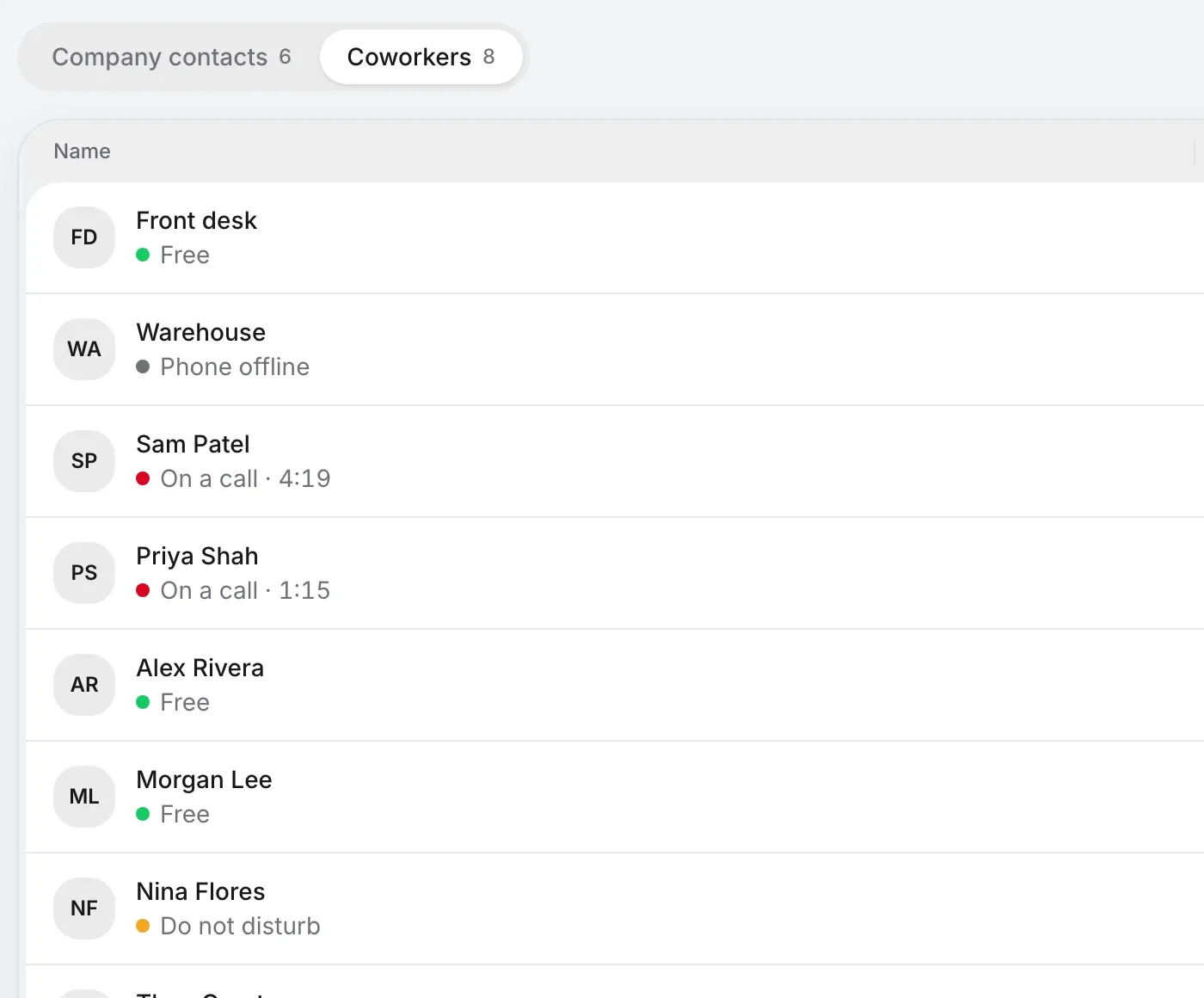
Coworkers: everyone with an extension, each saying whether they’re free, on a call or away

Anyone can tidy it. And you can see who did.

A shared list only stays good if the person who knows can fix it. Changes go in the activity log, and a deleted contact’s calls stay in history.

WhatOwners and adminsStaff
See contacts and their notesYesYes
Add, edit, delete and importYesYes
Export them all as a fileYesNo

The same list for the whole house.

A home gets it too, shared between everyone on the account. Mark the people who matter as Always rings, and they get through quiet time and do not disturb.

Questions about contacts.

Who can see shared contacts?
Everyone on the account, and our support team when they’re signed in to help. Notes on a contact are shared too, so keep private details out of them.
Can I name a caller from call history?
Yes. Press Save name on any call or voicemail and the number becomes a contact, or joins one you already have.
What if two people share a number?
A number belongs to one contact. A person behind a switchboard gets the same number with their own extension, and that counts as a number of their own.
Does importing overwrite what we have?
No. You see what will be added and what will be skipped, and why, before anything is saved. A number already on a contact is skipped, never changed.
Does it sync with our CRM or Google?
Not as contacts. HubSpot and Sonar show a caller’s record while a call rings, and a file brings in the rest. There’s no automatic sync.
Can someone always ring through at home?
Yes. Mark a contact as Always rings and their calls get through quiet time and do not disturb.

Stop wondering who that was.

Check your number, then pick a plan. Contacts come with every Kafono account.

No number yet? Pick a new one

Rather talk it through? Write to us and a person answers.